
Closing the loop on billing: why reconciliation belongs in the same system as your invoices
The end of the billing month has a last step that can be particularly painful. You have sent the invoices. Now you open your banking, look at your transactions, and start matching. This deposit is the Nguyen family. This one is a sibling pair, so it covers two invoices. This one arrived with no name attached and you have to think about who it might be. You tick names off a list, mark invoices paid, and try not to lose your place when you're interrupted by having to start a lesson.
This is reconciliation, and for many teachers it is the part of billing that gets done late, or in a rush, or not properly at all.
The last mile is knowing who paid
Sending an invoice is only half of billing. The other half is knowing it was paid, because that is what tells you who to chase and who to leave alone. Get it wrong in one direction and you send a reminder to a family who paid three weeks ago, which is embarrassing. Get it wrong in the other and a family drifts two months behind without you noticing.
If you connect your Stripe account to Octavia, and invite your families to pay online using a credit card, then the reconciliation is taken care of for you, without you needing to lift a finger. Invoice gets sent, parent pays online, Octavia shows the invoice as paid.
But bank transfer makes the reconciliation process less straightforward. The money lands in your account with whatever reference the parent chose to type, which is often their own name rather than the student's, or nothing useful at all. Matching a list of deposits to a list of invoices is slow, and it is exactly the kind of slow, repetitive checking where attention slips.
Why the matching is so fiddly
The reconciliation problem exists because the pieces usually live in different places. Your schedule is in a calendar. Your invoices are in an invoicing tool or a spreadsheet. Your payments are in your banking. None of these know about the others, so you are the connection between them. You read the schedule to decide who to bill, you build the invoices by hand, and then at the end you sit with a bank statement in one window and your invoice list in another and join them up yourself.
Every one of those handoffs is a place where a number gets copied wrong or a payment gets missed.
What a connected system removes
When the schedule, the invoicing, and the payment matching sit in one system, the chain closes on its own.
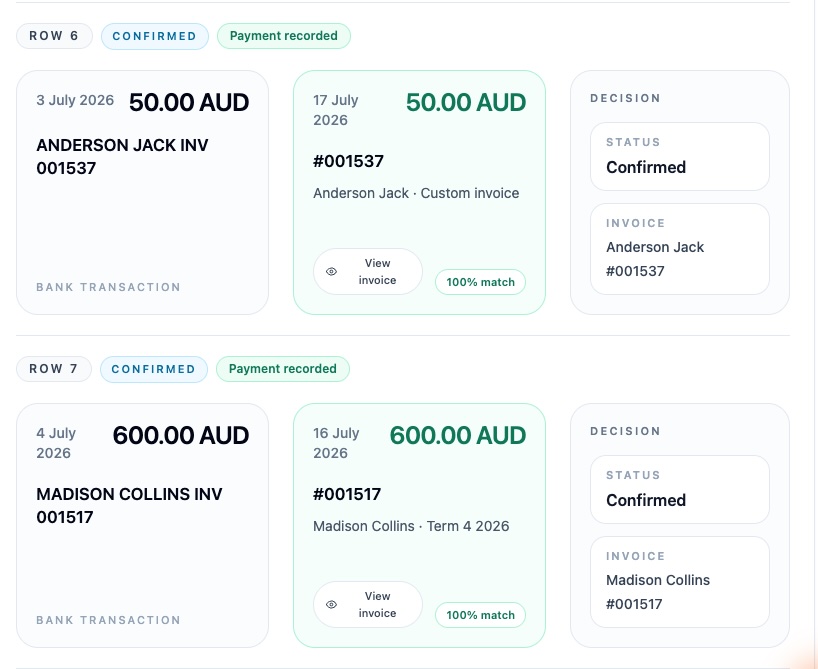
The system already knows your calendar, so it knows how many lessons each student had and what that comes to. It raises the invoices from that, without you working out lesson counts by hand. Then, when the transfers come in, you export a CSV from your bank, upload it, and the same system lines those deposits up against the invoices it raised. It reads the amount, and any name, reference, or invoice number in the transaction text, and proposes a match. You confirm the ones it got right and sort out the few it flagged for a look. What was an evening of cross-checking becomes a single pass down a list.
The system that decided who to bill is the same system that confirms who paid, so nothing has to be re-entered or re-matched between the two.
How Octavia does this
Reconciliation is the newest piece of this in Octavia, and it is the piece that makes the rest of the billing chain worth having in one place.
Octavia bills from your schedule already: it recognises what each student is due for, raises the invoices, and can send them without you generating anything. Bank reconciliation completes the circle. You upload a CSV export from your bank, Octavia recognises the date, amount, and reference columns, and matches the incoming transfers against your unpaid invoices. It leans towards asking you to confirm rather than acting on its own, so a borderline match is handed to you, not guessed at. Confirming a row records a normal bank-transfer payment against the invoice, the same as if you had entered it by hand, and it will not record the same transfer twice if you upload an overlapping statement later.
The point of creating invoices within Octavia is not just so you can bill your families. It is being able to see, at any moment, who owes you what, without using three different tools together to find out. Reconciliation is the step that makes it clear who has paid, and what they have paid for.
And the brilliant thing is, if a parent accidentally overpays, or pays twice, you can easily create a credit from within that same system, which can then be applied to a future invoice.
Bank reconciliation and account credits are available on the Pro and Studio plans. On the free plan, within your first month, you get access to the full Pro features, so you can create an account, open the workspace and see how it works before deciding whether it earns its place in your workflow.