
How to Run a Practiceathon at Your School
What if getting your students to practise more was as simple as turning it into a game - with a little friendly competition, some community spirit, and maybe a few prizes thrown in?
How to Run a Practiceathon at Your School
What if getting your students to practise more was as simple as turning it into a game - with a little friendly competition, some community spirit, and maybe a few prizes thrown in?
That's the idea behind a practiceathon, and it works. Whether you're hoping to raise funds for your music program, simply want to build a culture of consistent practice, or both, a practiceathon is one of the most effective and genuinely enjoyable events a music school or department can run. In this guide, I'll walk you through everything you need to know to run one - from the first planning meeting to handing out the prizes - including templates for all the communication you'll need along the way.
If you want the ready-to-use materials rather than building everything from scratch, you can download the full Practiceathon Resource Pack. It includes templates, checklists, parent emails, a student tracker, planning resources, a sponsor letter, paper practice log, assembly script, and follow-up email.
What Is a Practiceathon?
A practiceathon is a time-limited practice challenge. Students commit to practising their instrument over a set period - typically two to four weeks - and log every minute they play. Like a walkathon or readathon, the event creates a shared sense of momentum: everyone is working toward the same goal at the same time, and that collective energy is surprisingly motivating.
There are two main formats:
Practice-only. Students simply set a goal and log their practice. Great for building habits, running at the start of a new year, or preparing for an upcoming performance season. Simple to run, no fundraising complexity.
Practiceathon with fundraising. Students collect pledges or donations from family and friends based on how much they practise. This is a powerful combination: it motivates the students to actually do the practice (they don't want to let their sponsors down), and it raises money for your music program at the same time.
Both formats share the same core mechanics, and this guide covers both. I'll flag clearly where fundraising adds extra steps.
Why Does It Work?
The research on practice habits is pretty clear: most students don't practise as much as they should, and much of the practice they do is inefficient. A practiceathon helps on both counts.
First, the external accountability of logging practice publicly - and especially of having sponsors counting on them - creates a motivation that weekly lessons alone can't always provide. Students who know their grandparent has pledged $1 per hour tend to find time in their schedule that they couldn't previously find.
Second, the social and competitive element of a leaderboard (if you use one) is remarkably effective. Students who would shrug off a teacher's encouragement will practise an extra 20 minutes to beat their friend's total.
Third, for students who are intrinsically motivated but scattered in their habits, setting a concrete goal - "I'm going to practise 30 minutes every day for four weeks" - and then tracking progress toward that goal is a habit-formation intervention in its own right.
And for the music program? A well-run practiceathon can raise meaningful funds in a way that feels connected to the school's mission, rather than selling chocolate bars.
Planning Your Practiceathon
The Core Decisions
Before you start sending letters home, get clear on a few fundamentals.
How long will it run? Two to four weeks is the sweet spot. Short enough to feel like a sprint, long enough to make a real difference to students' practice habits. Four weeks is ideal if you're running a fundraiser, as it gives students more time to accumulate hours and sponsors more time to see results.
Who can participate? Is this open to all students who learn an instrument through the school, regardless of teacher? Only students in specific ensembles or groups? Including as many students as possible generally leads to better outcomes - more total practice, more fundraising, and a greater sense of school-wide participation.
What are you tracking? Minutes of practice is the most common measure, and the simplest. You could also track sessions (number of days practised), pieces learned, or a combination. For leaderboards and prize decisions, minutes is the cleanest metric.
Will you require parent verification? For younger students especially, it's worth requiring a parent signature or confirmation for each practice session to be counted. This keeps prize-eligible practice honest, and parents appreciate being kept in the loop. For older students, you might rely on the honour system for day-to-day logging and only require verification for prize contenders.
Will you run prizes? Prizes are optional but effective. See the prizes section below for ideas.
What's your tracking system? See the next section.
Choosing How to Track Practice
This is one of the most important decisions, and it's worth thinking about carefully. You have a few options, ranging from simple paper-based systems to fully integrated online platforms.
Option 1 - Paper practice logs. The simplest approach. Students receive a printed practice log sheet (a template is included at the end of this article) and fill it in each day, getting a parent signature. They hand in (or photograph and submit) their logs at the end.
Pros: No tech required, works for all ages, easy to understand.
Cons: Relies on students keeping hold of a piece of paper for four weeks; no real-time leaderboards; more admin at the end for tallying results; harder to run a fundraiser alongside it.
Option 2 - A hybrid system. Students log their practice using an online tool (even a simple Google Form) that feeds into a shared spreadsheet, while donations are collected separately via a platform like TryBooking, Chuffed, MyCause, or a school's existing payment system.
Pros: Enables online leaderboards; more motivating for students who can see their progress; makes fundraising more viable.
Cons: Two separate systems to manage; some reconciliation work at the end; less elegant for connecting practice totals to sponsor pledges.
Option 3 - A dedicated practiceathon platform. Purpose-built platforms exist for running practiceathons - including Octavia, which has a fully integrated practiceathon feature built specifically for music schools and teachers. More on this below.
For a small event (under 30 students, practice-only), Option 1 is perfectly fine. For anything larger, or for any fundraising component, I'd strongly recommend Option 2 or 3. The ability to show students a live leaderboard is, frankly, a game-changer for participation rates.
Building Your Team
Unless you're running a small studio event on your own, you'll want a small team. For a school music department, that might be:
- Lead coordinator (probably you) - oversees the whole event, writes communications, manages the platform
- Admin support - handles registrations, queries, and tallying if needed
- Student liaisons - music captains or student leaders who can announce the event at assemblies and generate peer excitement
- Parent association contact - if you're fundraising, involve the parents' association early; they can help promote the event and handle financial oversight
- Other music staff - loop them in early so they can encourage participation in their own lessons
Choosing Your Timeline
Here's a suggested six-week run-up for a fundraising practiceathon. Adjust the lead time depending on your school's communication cycles and how much complexity you're adding.
Six weeks out
- Finalise the format, dates, and platform
- Brief other music staff
- Contact the parents' association if fundraising
- Set up your tracking platform or prepare paper logs
- Brief student music leaders so they're ready to champion it
Four weeks out
- Send the initial letter to parents (template below)
- Post a notice in the school bulletin or newsletter
- Open registrations if using an online system
Two to three weeks out
- Launch announcement at school assembly (script below)
- Send detailed student information and the sponsor letter template
- Encourage students to start seeking pledges before the practiceathon begins
- Hang posters in music spaces and high-traffic student areas
Practiceathon week 1
- Send a reminder email to parents
- Post leaderboard updates if you have them
- Encourage music staff to mention it in lessons
Practiceathon weeks 2–4
- Weekly updates with leaderboard or participation stats
- Keep energy up with reminders in the bulletin
- Remind students to keep collecting pledges
Practiceathon ends
- Send final results to participants
- If fundraising: remind students to contact sponsors and collect donations
- Allow a grace period (1–2 weeks) for donations to come in
- Tally results, verify prize-eligible entries, and announce winners
Prize-giving
- Announce winners at an assembly or in the bulletin
- Arrange prize-giving; consider making it a small celebration
Working With Parents
The Parent Communication Strategy
Parents are the key to a successful practiceathon. They need to understand what the event is, help their younger children participate, verify practice logs, and - if you're fundraising - support their child in approaching sponsors and collecting donations.
The most common mistake with practiceathon communications is sending everything at once. Spread your communications out, and make each one purposeful:
1. The announcement letter - what it is, when it runs, what's expected
2. The information letter - all the detail: how to register, how logging works, how to seek sponsors, the prizes
3. Reminders during the event - short, energising updates
4. The final push - remind parents that the practiceathon is ending and that it's time to collect donations (if fundraising)
Keep parent communication clear, jargon-free, and brief. Busy parents scan rather than read. Lead with the most important information, use bullet points for the key steps, and make sure any links or registrations steps are as frictionless as possible.
The Fundraising Component
If you're running a fundraising practiceathon, here's how the pledge model works.
How Pledges Work
Sponsors can support students in two ways:
Per-unit pledges - a sponsor agrees to donate a set amount for each hour (or half hour) the student practises. For example, "I'll give $1 for every 30 minutes you practise." The student collects this pledge upfront, practises during the event, and then contacts the sponsor at the end to let them know their total - and to collect the donation. The sponsor can cap their pledge at a maximum amount if they wish.
Flat-rate donations - a sponsor makes a set donation regardless of how much the student practises. This is simpler for the donor and is ideal for people who want to support the student but don't want to calculate amounts at the end.
Collecting Donations
If you're using an online platform, supporters can donate directly through the student's personal fundraising page, which keeps a running total. If you're working offline, students will need to follow up personally with each sponsor at the end - and they'll need a bit of coaching to do this confidently. Remind them that their sponsors agreed to donate, so following up is not imposing; it's just closing the loop.
For per-unit pledge collectors, the student needs to:
1. Tell the sponsor the total practice time they achieved
2. Calculate the donation amount based on the pledge
3. Provide a link or method for the sponsor to pay
Build at least one or two weeks of grace time after the practiceathon ends for donation collection, as this phase always takes longer than expected.
Where Does the Money Go?
Be clear and specific in all your communications about exactly how the donations will be used. Vague answers ("supporting the music program") are less motivating than specific ones ("buying new instruments and funding music bursaries for students who can't afford to learn"). Supporters are more likely to give generously when they can picture the impact.
Online Donation Platforms
If you're fundraising and want to accept online donations, you'll need a payment platform. Options include:
- Raisely - a dedicated fundraising platform with individual participant pages, pledge tracking, and leaderboards. Good for larger events.
- MyCause - popular for Australian school fundraisers; allows both individual and campaign pages.
- TryBooking - commonly used by Australian schools for events and can be adapted for fundraising with flat-rate donations.
- Octavia - if your school uses Octavia for music administration, the built-in practiceathon feature includes integrated Stripe-based donation processing, individual student fundraising pages, and real-time leaderboards without needing a separate platform. More on this below.
Using Octavia to Run Your Practiceathon
If your school uses Octavia for music administration, you can run your practiceathon directly within Octavia, without needing a separate tracking or fundraising platform. Here's what that looks like from a teacher's perspective.
What Octavia's Practiceathon Feature Does
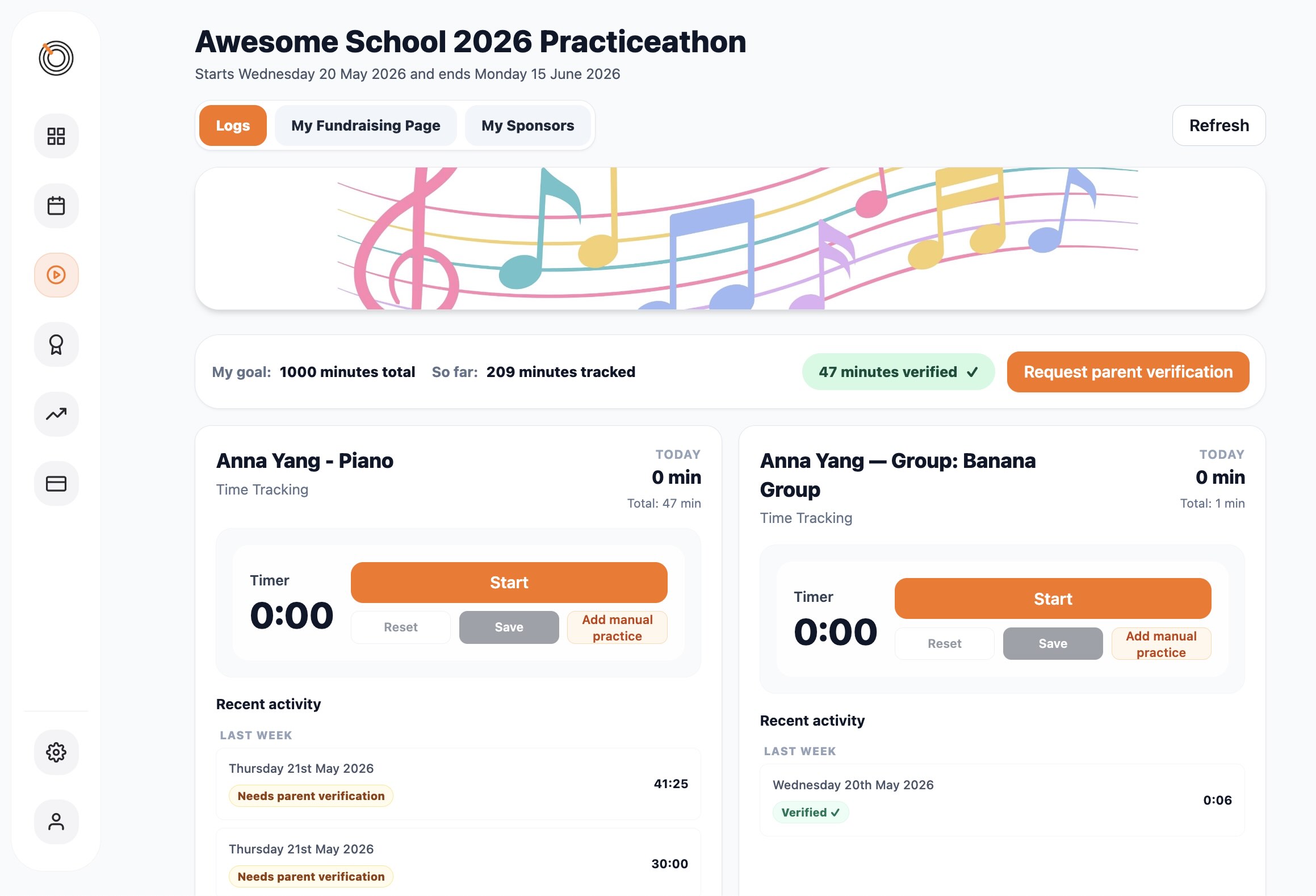
Octavia's practiceathon feature is built specifically for music schools and private studios. Once you set up a practiceathon, students log in through the Octavia Family Hub to record their practice sessions. The system keeps a running total for each student and updates the leaderboard in real time.
For fundraising events, each student gets a personal public fundraising page that supporters can visit to make a donation. Payments are processed securely through Stripe, and the money goes directly to your school's Stripe account - Octavia doesn't take a cut of donations. Students can also collect pledges (per-hour or flat-rate), which supporters can commit to upfront and pay later.
Teachers can view the full picture from the Octavia dashboard: which students have enrolled, how much each has practised, how fundraising is tracking, and reports for prize decisions.
Running a Practiceathon Without Fundraising
Octavia's practiceathon feature works just as well as a practice-only event. You can set up the campaign without enabling fundraising, and students simply log their practice and compete on the leaderboard. This is a great lower-effort option for teachers who want the motivational benefits of a practiceathon without the added complexity of donation collection.
Practice Verification
For prize-eligible practice, Octavia allows you to require parent confirmation of each logged session. Once a student logs their practice, a parent receives a notification and confirms it through the Hub. This removes the burden of paper sign-off sheets and creates a clear, timestamped record for prize verification at the end.
Prizes and Motivation
Prizes aren't essential, but they add a lot of energy to a practiceathon. The key is to strike the right balance: prizes should be desirable enough to motivate, but not so high-stakes that they create anxiety or discourage students who feel they can't win.
Prize Categories to Consider
Think about award categories that give more students a chance to win:
- Most practice logged (school-wide or by age group / year level)
- Most funds raised (if fundraising)
- Most consistent - most days with at least one session logged
- Most improved - biggest jump in practice time compared to their normal habits
- Year-level prizes - top practicer or fundraiser in each year group
Splitting prizes by junior and senior school helps acknowledge the different amounts of practice that those two groups might typically do, and give all students a chance at prizes.
What to Give
Prizes don't need to be expensive to feel meaningful. Ideas that have worked well:
- Vouchers for local food or retail (let students vote on what they'd prefer - they'll be more motivated by something they chose)
- A "mystery prize box"
- A small cash prize
- A trophy or certificate to display at home
- An experience - front-row seats at the school concert, a guest lesson with a visiting musician
- Extra canteen credit
- Recognition in the school newsletter or on the school's social media
Ask your music captains or student leaders what prizes would actually excite students - this always leads to better choices than what the adults guess.
Motivating Students Throughout the Event
Don't wait until the end to celebrate. Keep energy up throughout:
- Post weekly leaderboard updates (even an email or bulletin notice works)
- Mention milestones in school announcements ("Our students have now logged over 500 hours of practice!")
- Have music staff give shoutouts in lessons and at ensemble rehearsals
- Create a small visual tracker - a thermometer or progress bar on a poster in the music hallway
Practiceathon for a Private Studio
Everything in this guide applies equally to private music studios, not just school music departments. For a studio event, you'll typically be working at a smaller scale - perhaps 20–50 students - which actually makes logistics simpler.
A few things to consider if you're running this for a private studio:
Registration - your existing client database is your list. If you use a studio management platform like Octavia, you can enrol students directly and send registration links through the parent portal.
Communication - you probably communicate with parents via email or a studio newsletter. The parent letter template below adapts easily for a studio context (swap "school" references for "studio" or "music school").
Fundraising - a studio practiceathon can raise money for a specific cause (instrument fund, bursary program, a local charity your studio supports) or simply focus on practice goals. If you're fundraising, be clear about what the money is for and how it'll be managed.
Community - one of the lovely side effects of a studio practiceathon is that it creates a sense of shared community among students who otherwise practise in isolation. Even without a live event, sharing practice totals and a leaderboard creates connection.
After the Practiceathon
The practiceathon doesn't end when the logging period closes. The week after is often when the real teaching happens.
Follow up in lessons: ask students how they found the experience of practising more intensively. What did they notice about their playing? Was there a point where it started to feel easier? Did they find strategies that worked better than others?
Celebrate the collective achievement. Share total practice hours across all students - this is a powerful number that deserves to be celebrated.
If you ran a fundraiser, make sure you close the loop with parents and sponsors on how much was raised and what it'll be used for. A follow-up letter or post with specifics ("we raised $3,200, which will fund three new instruments and two music bursaries") makes sponsors feel that their contribution was genuinely meaningful. They'll be more likely to give again next year.
The full templates, sponsor letter, paper practice log, assembly script, and follow-up email are available in the Practiceathon Resource Pack, so you can keep the planning simple and adapt the materials to your own school or studio.
And finally: think about what you'd do differently. The first practiceathon always has rough edges. Debrief with your team while it's fresh, and note what you'd change for next time.