

Multi-Teacher Support
Running a team? Octavia brings everyone together.
All teachers work from the same shared student records, making collaboration effortless and giving families a consistent experience across your studio.
Here's what happens when you sign up to a Studio Plan.
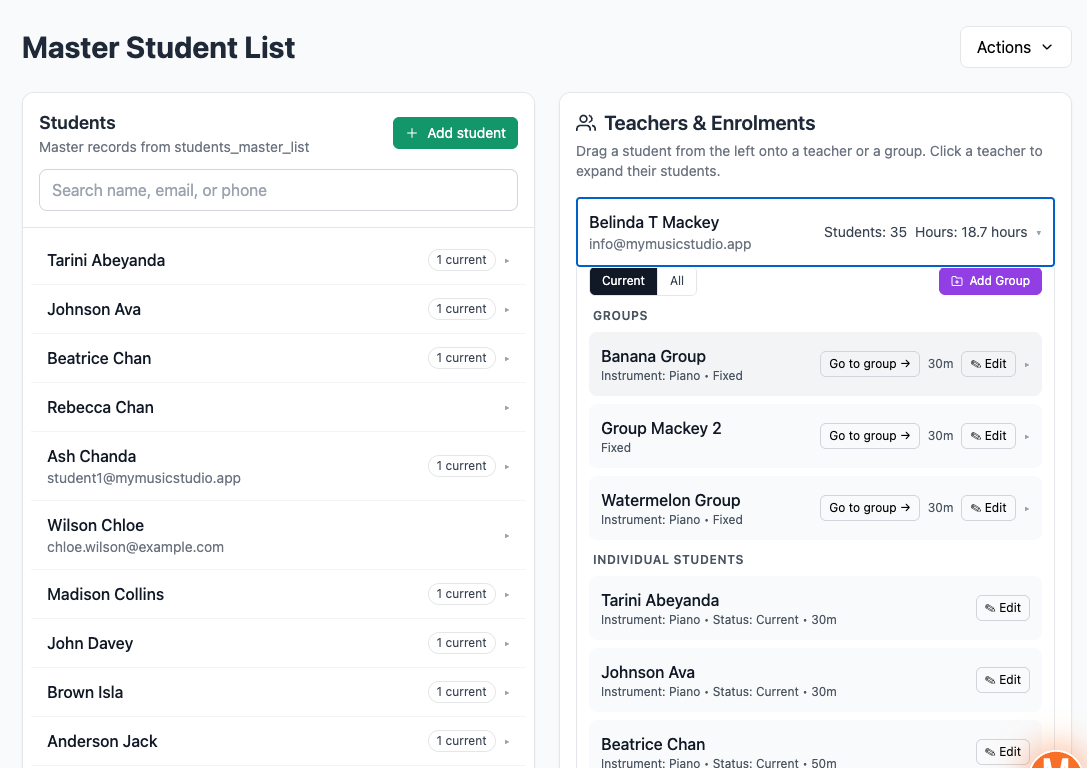
Your studio works off one master list of students and one master list of teachers.
You assign students to teachers, either individually or in groups.
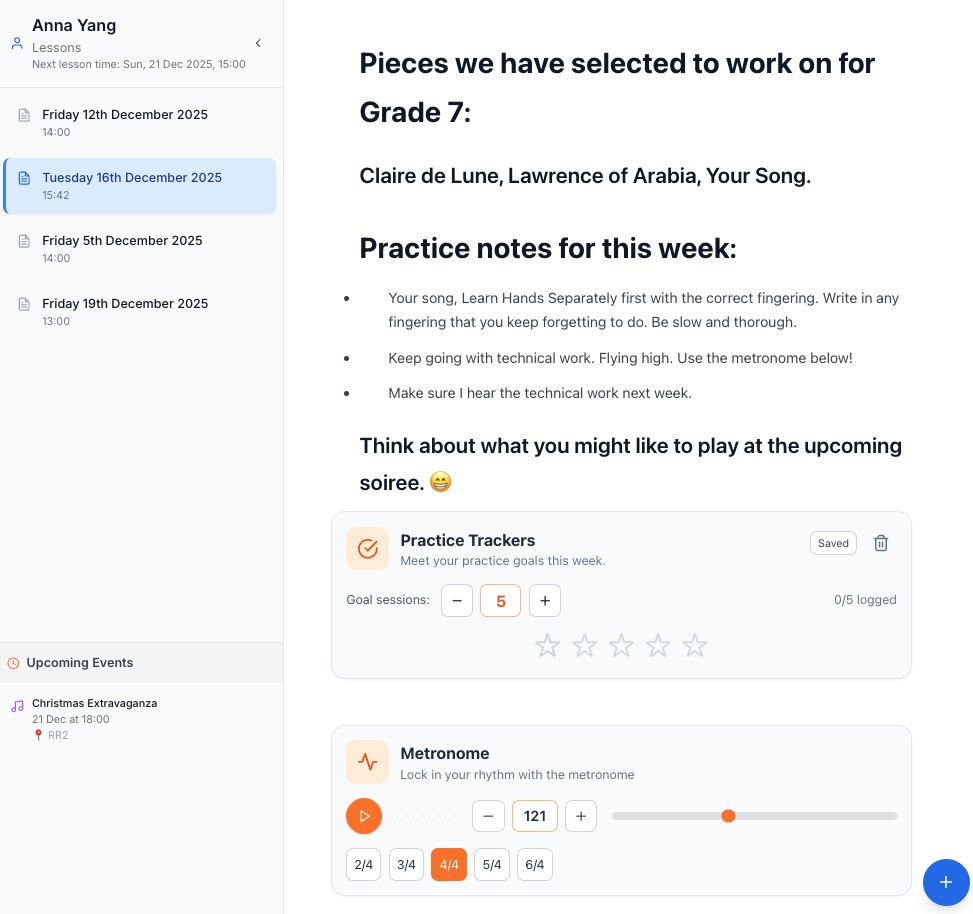
Your teachers access Octavia and can interact with all of the normal teaching tools.
Administrators get extra views that allow them to run the backend of your studio seamlessly.
Built for busy music studios
Because your business needs a system purpose built for your industry.
Running a music studio has its own particular requirements.
That's why relying on generic administration tools doesn't cut it.
You want the business side to run smoothly, so you need communication, billing and scheduling tools that are fit for purpose.
But you also want your teachers to have access to educational features to perform your core business well - the teaching.
As an administrator
Here's what you can do.
View, create and update teacher records
View, create and update student records
Easily manage enrolments throughout the school with a drag and drop interface
View all teachers' schedules at once in a colour-coded calendar, or zoom in to any individual teacher's view
Switch between your own view and any teacher's view across lessons, news, performances, and practiceathons — with the owning teacher shown on every row in all-teachers mode
View and mark attendance for any of your teachers' lessons
Create and manage student exams — exam enrolment is admin-managed across the school
Create school-wide performances, practiceathons, and news items that all teachers can enrol their students in
Assign substitute teachers to individual lessons so cover is tracked and the right teacher has access
Mark teachers as accompanists and assign them to student exam and performance entries — their commitments appear in their calendar automatically
Generate and manage invoices across all your teachers' students from one place
As a teacher
Here's what they can do.
See their own students' and parents' contact information
Plan and update their timetable
Mark their students' attendance
Write lesson notes, with access to all the lesson tools
Create news items for their own students
Manage their own teacher-owned performances and practiceathons
Add their students to school-wide performances and practiceathons
Cover lessons as a substitute teacher, with full access to attendance and notes for those sessions
View room bookings across the school
Want to have a peek inside?
Click on the images below for a sneak peek into some of the areas an administrator would work in with the Studio Plan.
Browse the images
Click on an image to view the detail.
Scroll, or use the arrows
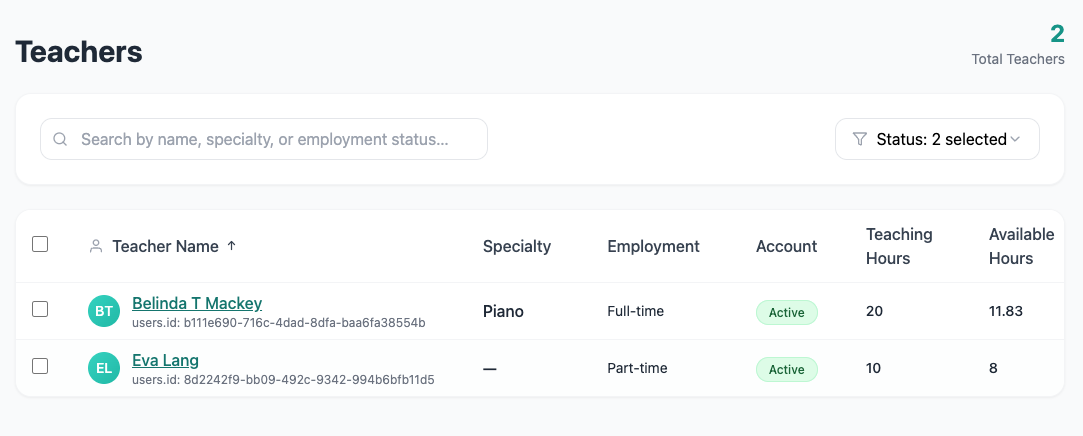
List of Teachers
View your list of teachers, their specialty and their teaching hours from one place. Click on any teacher to view more detail.
Substitute teacher coverage
Cover is tracked. The right teacher has access.
When a teacher can't make a lesson, you need the cover teacher to have everything they need — without handing over ownership of the student or the lesson history.
The substitute teacher feature is built for exactly this. Admins assign a substitute to any lesson, and the covering teacher gains full access to that session: they can view attendance, mark it, and write lesson notes. The lesson still belongs to the original teacher for reporting and billing purposes — the staffing just changes for that session.
How it works
An administrator assigns a substitute teacher to any lesson — from the lesson detail or the calendar event
The substitute teacher sees the covered lesson in their own calendar, clearly marked as a covered session
The original teacher's calendar shows the lesson greyed out so they know it's being covered
The substitute teacher can mark attendance, clear it, and write lesson notes — full operational access for that session
Lesson ownership, billing, and history remain with the original teacher throughout
Makeup lessons inherit the substitute assignment from the original, so the staffing stays consistent
Room bookings
Know exactly where every lesson is happening.
Shared teaching spaces are a coordination headache without the right tools. Octavia's room booking system is built for multi-teacher studios that need to manage rooms properly — not just stick a name in a notes field and hope for the best.
Administrators set up your rooms and create bookings for them. Teachers can see what's booked across the school. The whole system integrates with the main calendar so room commitments are visible alongside lessons.
Define your rooms
Set up each teaching room with a name, type, capacity, and colour. Archive rooms when they're no longer in use without losing their history.
Standing bookings
Create recurring room bookings on a weekly or fortnightly pattern. Edit, cancel, or modify individual occurrences without affecting the rest of the series.
One-off bookings
Book a room for a single session by clicking and dragging on the room calendar. Pre-fills the room, date, and times so creation is fast.
Room unavailability
Block out rooms for maintenance, closures, or reserved periods. School-level settings control whether unavailability warns or hard-blocks booking attempts.
Weekly Summary
A compact overview of all standing bookings across your rooms and weekdays at a glance — the fastest way to see how your studio space is being used.
Room Bookings Calendar
A full day, week, and month calendar view with rooms as columns. Colour-coded by room, with conflict checking built in so double-bookings can't slip through.
Conflict rules are configurable at the school level: same-room overlaps are blocked, teacher overlaps can be set to warn or block, and room unavailability follows the same warn/block policy. Admins stay in control of how strictly the system enforces space allocation.
Run your whole studio easily with Octavia.
Everything is designed to keep your business running smoothly, your teachers focused on teaching, and your families informed, engaged and happy.
Contact us
To learn more about the Studio Plan, please contact us.
Or get started by creating an individual teacher account to try it out. You can upgrade to Studio from there.