
Octavia SMS consent and opt-in process
Octavia sends SMS only for school-related operational notifications, such as lesson reminders and important news announcements. These are not public marketing sign-ups.
Consent is collected inside a logged-in Family Hub account so the person opting in is choosing settings for their own family account. A saved phone number alone does not count as consent.
What to expect from SMS notifications
Octavia SMS notifications are designed for practical school communication. Before anyone submits this request, they can review the message types, consent wording, and policy links shown on this page.
School-related SMS updates, including operational lesson notifications and optional school news.
Message frequency may vary depending on school activity and the notification categories selected.
Standard message and data rates may apply.
If you ever want to stop receiving messages, you can reply STOP. If you need help, you can reply HELP.
Review our Privacy Policy and Terms & Conditions.
Public Octavia SMS opt-in request
If you already use Octavia through your school or studio, you can use this form to request SMS notifications. You can manage your actual notification settings any time in Family Hub.
Choose the SMS categories you want below. All options are off until you select them.
Managing your SMS preferences
Once you are logged in to Family Hub, you can save your mobile number, turn on master SMS consent, and choose which notification categories you want to receive for your own family account.
Log in to Family Hub
SMS preferences are available only to authenticated account holders linked to a school or studio.
Save your number and grant consent
Enter your mobile number, then turn on master SMS consent. This cannot be switched on until a mobile number has been saved.
Choose your categories
After consent is granted, choose which kinds of updates you want, such as lesson reminders or school news announcements.
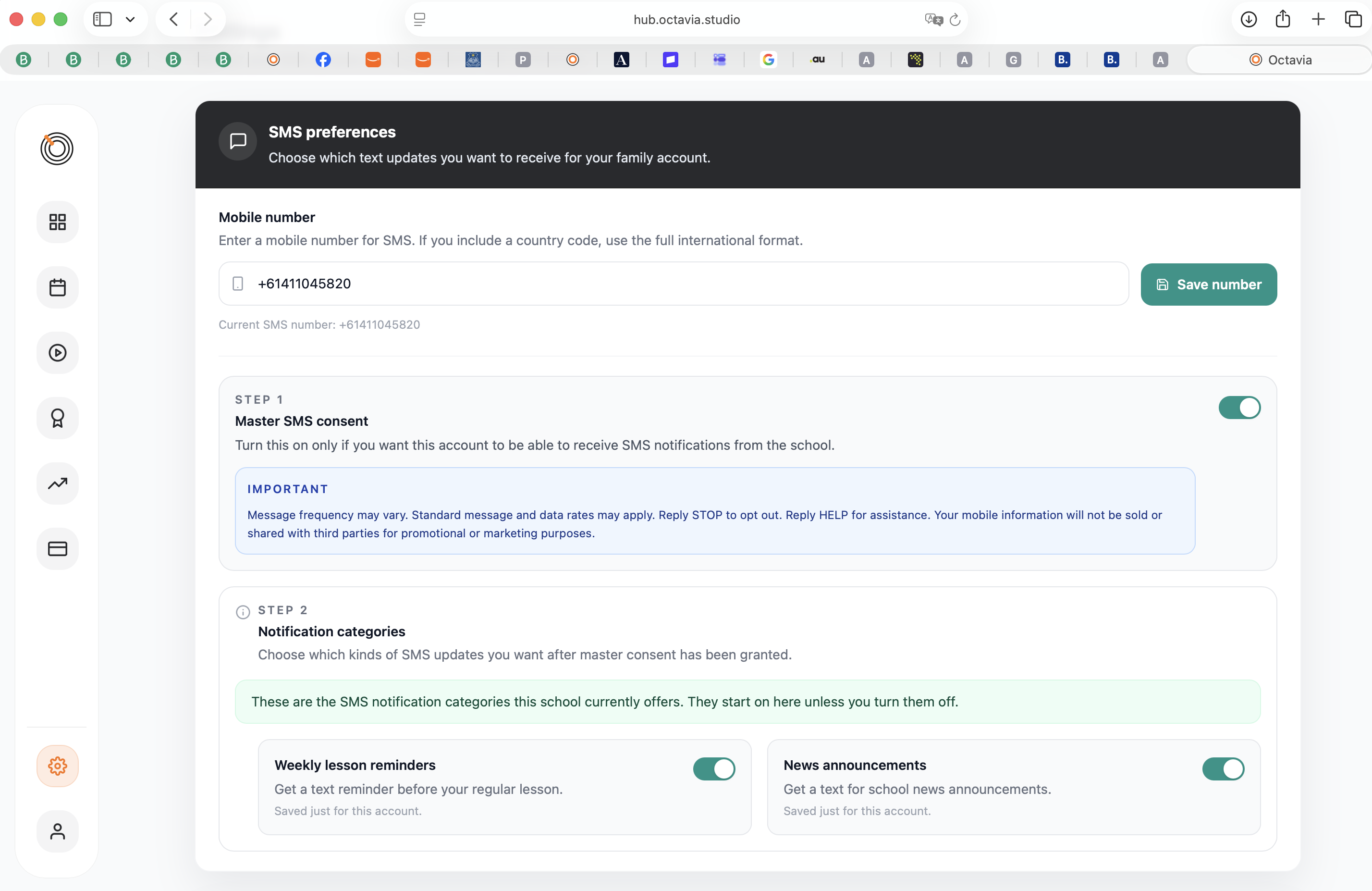
In Family Hub, you can add your mobile number, turn SMS on or off, and choose which kinds of updates you want to receive.
Additional notes
- You control your own SMS preferences from your Family Hub account.
- Your school or studio chooses which types of SMS updates are available.
- News announcements are chosen separately from lesson-related SMS updates on this public request form.
- You can opt out of messages at any time by replying STOP.
- Any changes to your live SMS settings happen inside Family Hub.