
Octavia on Your Phone: The Mobile Teacher View Is Here
Octavia on your phone - the mobile teacher view is here
A while back I wrote an article explaining why the Octavia teacher app wasn't optimised for phones. The short version: teacher administration involves dense information, precise actions, and real consequences if something goes wrong. Squashing all of that onto a small screen wasn't something I wanted to rush.
The same article made a promise, though. There are specific teaching moments where quick phone access genuinely helps - checking who you're teaching today, opening a lesson note while you're sitting at the piano, marking attendance without having to navigate to your laptop. For those situations, a lightweight mobile view made sense. It just needed to be done deliberately, for those specific use cases, rather than as a shrunk-down version of the whole desktop app.
That's what I've been building. It's now available.
What the mobile teacher view is
The mobile teacher view is a streamlined version of Octavia designed specifically for smaller screens. It is not a full copy of the desktop app, and it's not trying to be. What it gives you is fast access to the things you're most likely to need on your phone during a teaching day.
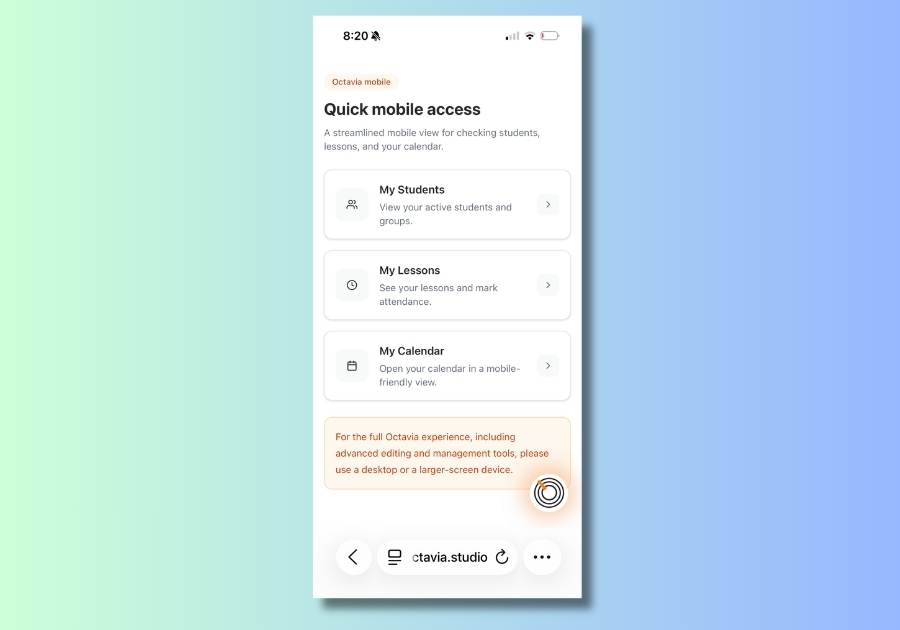
From the mobile dashboard, there are three sections: your students, your lessons, and your calendar.
Students shows your active students and groups - useful for a quick look-up when you need to remember something between lessons.
Lessons gives you a day-by-day view of your teaching schedule. You can move back and forward through dates, see each lesson's time, duration, and location, and mark attendance directly from the list. Each lesson also has a lesson note button - either View note or Create note depending on whether a note already exists. Tapping it takes you straight into the note.
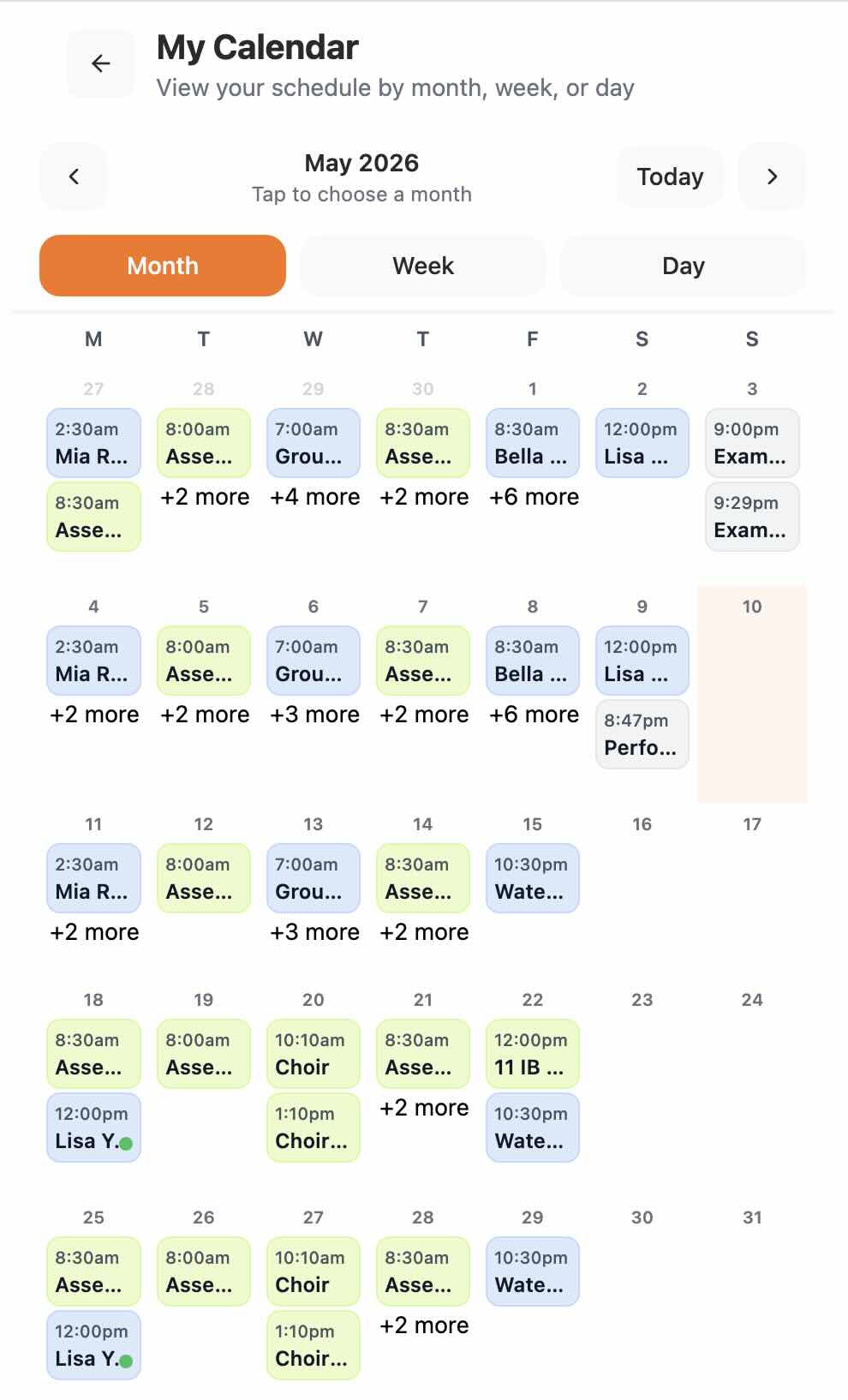
Calendar opens a mobile-friendly calendar view with month, week, and day options. Your lessons, performances, exams, and other events all show up with their colour coding. Tapping an event opens a panel where you can see the details, get to the lesson note, and handle attendance - all without leaving your phone.
Lesson notes on mobile
This was the piece I was most careful about. Lesson notes in Octavia can be fairly rich - text, embedded tools, recordings, practice trackers - and I didn't want to create a separate, simplified mobile note that existed alongside the real one. That would mean notes in two places, with the possibility of things getting out of sync.
Instead, when you open a lesson note on mobile, it's the same note. The content, the tools, the saved information - all of it is exactly what you'd see on the desktop. It just opens in view mode first, so you're reading before you're editing. If you need to make changes, you tap Edit.
Basic editing is working now. If you're trying to improve the quality and clarity of the notes themselves, How to Write Better Lesson Notes covers the teaching side of what makes lesson notes genuinely useful. You can read notes, create them if they don't exist yet, and make text changes. The mobile editing experience is still being refined - if you're writing long, detailed notes with a lot of formatting, a larger screen will still feel more comfortable for that. But for quick additions, corrections, or checking what was set last week, the mobile note is useful.
Attendance is also available directly from within the mobile lesson note, including for group lessons.
What this isn't
I want to be straightforward about the scope here, because I think it matters.
The mobile teacher view doesn't replace the desktop app. Billing, scheduling, studio management, detailed lesson note writing with interactive tools - all of that still belongs on a larger screen. I've kept a note at the top of the mobile view that says as much, because I'd rather be honest about the right tool for the job than have teachers try to do complex admin on a phone and find it frustrating.
What the mobile view is for is the moment you're in the middle of a lesson, or walking between them, and you need to quickly check something or record something. Those are the moments it's designed around.
What's still being refined
The mobile editing experience in lesson notes is working, but it's not yet as polished as I'd like it to be. I'll continue improving it. The overall mobile view is also intentionally lighter than the full desktop experience - some things available on desktop aren't there yet on mobile, and that's deliberate while I work through what genuinely belongs in a phone-first context and what doesn't.
If you've been waiting for a way to access Octavia on your phone during the teaching day, this is a practical starting point. One of the strongest pieces of feedback so far has come from teachers using lesson notes and scheduling across multiple teaching environments. Interview with Mei — Octavia User gives a practical example of how that workflow is being used day-to-day. And if you have feedback on what's working and what isn't, I'd like to hear it.